Make two web pages, and a stylesheet in only six easy lessons!
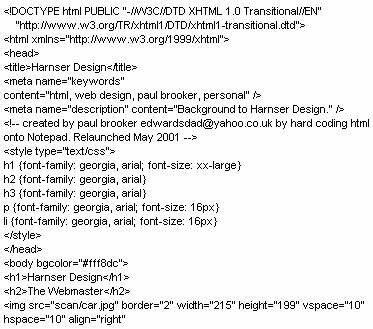 I have launched this site with a number of aims:
- To contradict the myth that html is to difficult to master, and that you have to use special web design software to build websites.
- To provide a simple but up-to-date introductory guide. Many tutorials teach bad and out-dated techniques, such as the capitalisation of code, and the use of font and center tags. Better to get it right from the start.
- Html is addictive, I enjoy making this site, I hope that it inspires someone else out there to develop the bug.
Why bother, why not just use software?
- Because learning and writing html for yourself is fun! Its often seen as a stepping stone to using real computer languages. Writing it yourself is more rewarding - would the Bayeaux Tapestry be the same if it was mass produced by machines?
- Knowledge of html is very useful to users of web design programs, when they want to make fine adjustments, add scripts copied from other sites, or repair the bad html written by their program.
- Because you can write better html than many wysiwyg programs. You can easily make it more browser friendly - for older and rarer browsers, but also for browsers of the future, such as those used on television sets, telephones, etc.
Html (Hyper Text Markup Language) is a simple scripting language, that uses tags to tell a browser program (such as Internet Explorer), what and how to display the text, colour, style, and images of a webpage. The W3 (World Wide Web) is made up of linked pages of html. Many modern browsers also read a number of other display languages, such as JavaScript, DynamicHtml, Perl, Cgi, etc - that can be incorporated into the Html source to provide extra features and general trickery. However, here, I'm just going to tell you how to start using html.
You can easily view the html source of your favourite websites. Using MS Internet Explorer, simply click on the View button, then select Source from the menu. If you are using Netscape Navigator as your browser, then click on View, then select Page Source. A page html source might look something like the image shown above!