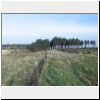
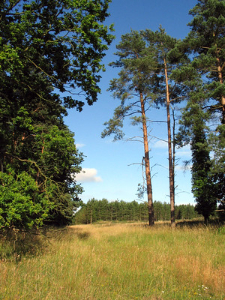
I am just about recovered enough to start surveying – so, I checked out Kings Forest in Suffolk. Unfortunately, there was still too much snow in the furrows, and I couldn't find any restocked compartments in that area of the forest. So I took the opportunity to try out the new Garmin Etrex GPS, and record a tumulus that I spotted on the Ordnance Survey Get-a-map service at 1:25,000. I couldn't find a name for this barrow – it wasn't shown on the 1891 OS map at Old Maps. Anyway, using the Garmin Etrex GPS, I located this barrow on foot, grid referenced it at TL 7872 7322, and photographed it – click on the thumbnail to see more...
1st January 2006
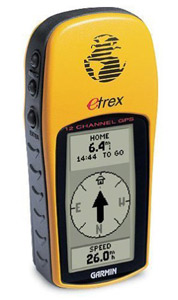
Garmin Etrex GPS Receiver Review
A Global Positioning System (GPS) Receiver is a device that receives signals from a number of orbiting satellites, and uses signal latency and data, with trilateration, to calculate its position on the Earth's surface. A handheld GPS receiver can offer hikers, ramblers, hunters, fishermen, metal detectorists, and amateur archaeologists the ability to easily navigate to a defined position, or to record the position of an object to an accuracy of a few metres. For my needs, a handheld GPS can help me find my way through the forest, and back to my car. It can help me record reasonably accurate grid-referenced locations for fieldwork, earthworks, survey plans, and findspots. Oh, and it's fun to use!
I chose the Garmin Etrex (basic) for its price, its weatherproofing, good reviews, because it can position and record British (Ordnance Survey) grid references, and because it's one of the cheapest handhelds around (circa £80 to £110 including tax). This GPS receiver does not have digital mapping facilities – no coloured street maps – it's not that type of GPS Navigator. Some older versions of the Etrex do not have EGNOS capability (see below) – mine is loaded with Software Version 3.30 which does support EGNOS (you can check by going to the Setup page, and selecting System), although it uses the North American name of WAAS.
It is made from a bright yellow plastic that makes it easier to find if it is dropped. Control buttons are located under rubber on its sides, allowing more frontal space for the monochrome display. I find the buttons a little bit stiff and difficult to operate, but perhaps this prevents accidental use. Through the control buttons, you can browse through five operational pages:
Skyview. I set this to Advanced Skyview, which gives more information about the satellites. To reach the Advanced Skyview, on the Skyview page, press enter, then select.
Map. This is useful while navigating. If you have selected a Go to a Waypoint from the Menu page, then Navigation is on, and a direction line will be drawn between your location, and the waypoint. As you move, a snail trail will be left behind your movements – handy for finding your way back. You are represented as an arrow, indicating which direction you are moving. You can zoom in or out using the up / down keys.
Pointer. This is the page that you will probably use when you are navigating – it simply shows a pointer on a rotating electronic compass, it shows the direction of the next waypoint, and the pointer tells you which direction you are heading in. Fields also show the distance to the waypoint (in a direct line), and your current speed.
Trip Computer. My favourite page, and the one that I will use while searching and conducting future surveys. It has five fields of data, but these can be customised for your needs, by pressing enter, and selecting change fields. There are 31 available data subjects that you can use – my choice are: Time of Day, Location, Elevation, Trip Odom, Lat/Lon. This allows me to easily see the time, the full grid reference, and how far I move.
Menu. This is the main setup and configuration area – also where you mark waypoints or routes, and start navigation. You can set a waypoint in the field by pressing Mark standing on the spot. You can customise the name, give it a map symbol, and check the grid reference. Alternatively, you can program waypoints or routes in advance, by entering grid references – they can be obtained the old-fashioned way, by OS map and a metric ruler, or online from the Ordnance Survey Get-a-map service. While you are on the Menu page, you need to set your Etrex to the Ordnance Survey British National Grid by going to Setup, then Units, then select British Grid in the Position Format. While on the Setup menu, also greatly improve accuracy (although at the expense of battery drain) by selecting System, and change the mode to WAAS.
British National Grid References. If you followed the configuration above correctly, any location field will now display the British grid referencing system. For example, my Etrex might show something like: LOCATION TL 85965 BNG 82625. The British Isles have been divided up into a grid of squares inside squares. The 100 km by 100 km squares are represented by two letters. The TL is one of those 100 by 100 km squares, the one over a part of Cambridgeshire, west Suffolk, and south-west Norfolk. The numbers correspond to smaller and smaller squares inside squares, the more numbers, the more precise the location. The first row of numbers moves the slider to the east. The letters BNG are just a Garmin thing, representing British National Grid, ignore them. The second row of numbers moves a slider to the north. Between an east line and a north line, you have the position.
Now, if I wanted to submit the location of a find by grid reference, how do I do it? Simple, using the example reading of LOCATION TL 85965 BNG 82625 in poor reception with very bad GPS accuracy available, or for large finds such as earthworks or a large site, I could use a grid reference that simply uses a 100-metre square, not very precise, but for large sites, it's all you need and it's better than nowt. A 100-metre location square would need six numbers: TL 859 826. OK, now my Etrex is giving better accuracy, say 5 metres, and I want to record an actual findspot – with more precision. That needs eight numbers, and using the above example Location reading, I would submit TL 8596 8262 which takes it down to a 10-metre square.
Tips.
Make sure that you have selected British National Grid, and have selected WAAS mode, which also enables it for the European EGNOS system. Earlier versions of the Etrex using firmware earlier than version 3 do not have this facility. EGNOS is the European equivalent of the North American WAAS system – that corrects for ionospheric distortion, and greatly improves accuracy. EGNOS satellites display D on the Skyview Advanced Page. Switching on WAAS decreases battery life, but increases accuracy – switch it on!
Customise the fields to your needs.
Buy some good NiMH rechargeable batteries. Keep a spare set on you.
Buy a PC patch lead for the Garmin – you can download and upload waypoints, routes, and tracks between the GPS receiver and a PC. I hope to review cheap software for this purpose soon.
Whenever you power up the Etrex, hold it out and still in the open, with good views to the sky for a few minutes. On startup, the Etrex scans for satellites and registers them – after that initial registration, it can find available satellites easier.
Accuracy and reception – As I move through the forest on narrow rides, reception is often broken, and reported accuracy can be poor – up to 30 metres. However, as long as you take the time to register the satellites when you start the trip, it will find them again when reception improves as you move. In the survey field – generally more open areas of felled forestry, reception improves, and depending on location, accuracy (according to the Skyview page) is claimed for between 2 and 10 metres – good enough for my needs.
In conclusion, the Etrex is a handy weatherproof tool, useful for the surveyor as both a navigation tool, and as an aid to plotting locations in a survey. It is not a replacement for maps, compass, measuring tapes, etc., but greatly complements fieldwork.
27th December 2005
Seasons Greetings!
I was off work recovering from my accident for two weeks – but I think that I used the time constructively – I completely revamped and relaunched this website – adding new image galleries for finds, earthworks and buildings, identifying struck flint flakes in the soil, and even for photos of the forest! Thetford Forest Archaeology has suddenly grown – to almost 100 web pages!
I have had a few walks around the forest, and checked out some restocked compartments. I hope to conduct at least a few surface collection surveys in Norfolk and maybe Suffolk, during January and early February! Until then, I would like to wish all my visitors the best of seasons greetings, regardless of your faith or beliefs, have a happy season...
23rd December 2005
Accident
OK, there may be a slight delay in getting started with the fieldwork – I had an accident at work, and now I have a probable rib fracture (not for the first time I am afraid). I must try to avoid jumping into dark confined spaces in power station boilers! Anyway, not really a problem – it's given me a little time to crack into the website and preparations.
Five years' absence has brought in new technologies. I now have a mobile phone and a digital camera to use in the field. Better still, I have asked my wife to ask Santa if he can bring me a Garmin Etrex handheld GPS receiver for Christmas. It will be interesting to see how it performs in the forest environment. It should be good for recording grid references in the open restocked compartments at least. Another incentive to resume the project!
I keep getting new ideas for this new website. I am working painstakingly on the much improved image gallery. I have incorporated the old Logs online reports sections with the old Latest News section – into this new 'Archaeo-Blogs' section – which I will from now on use weblog style – like an online diary for the Project and all things archaeology. Do you like it?
10th December 2005
Relaunch of Surveys!
I received an email from Jessica Holmes, a PhD student at the University of Sheffield. Jessie is writing a thesis on the archaeology and environmental history of the Brecklands. Anyway, it got me thinking about starting my fieldwork again. It has been five years since I conducted any field work. So, fired up with renewed enthusiasm, over the next few days I dug up my old measuring wheel, measure tapes, etc. I have not kept all of my old records very well – nor my computer files.
First job was rebuilding a spreadsheet that I could use to access my field data, calculate areas, percentages, and find densities. Second job – telephoned Colin at Suffolk Archaeology. He agreed to help me by sending me any up-to-date information on the Forest. Then I telephoned Rachael at the Forestry Commission to request a permit. Third job – start rebuilding this website!